
Image Metadata
This page covers capture and file properties read from images. For business fields defined by administrators and assigned by users, see Custom File Metadata.
Image metadata lets images be managed beyond file names and folders. BabelBird can use shooting information, dimensions and file properties in file details, search filters, material libraries, waterfall view, auto rename and batch rename. This makes enterprise galleries, brand assets, product images, project photos and design assets easier to find and organize.
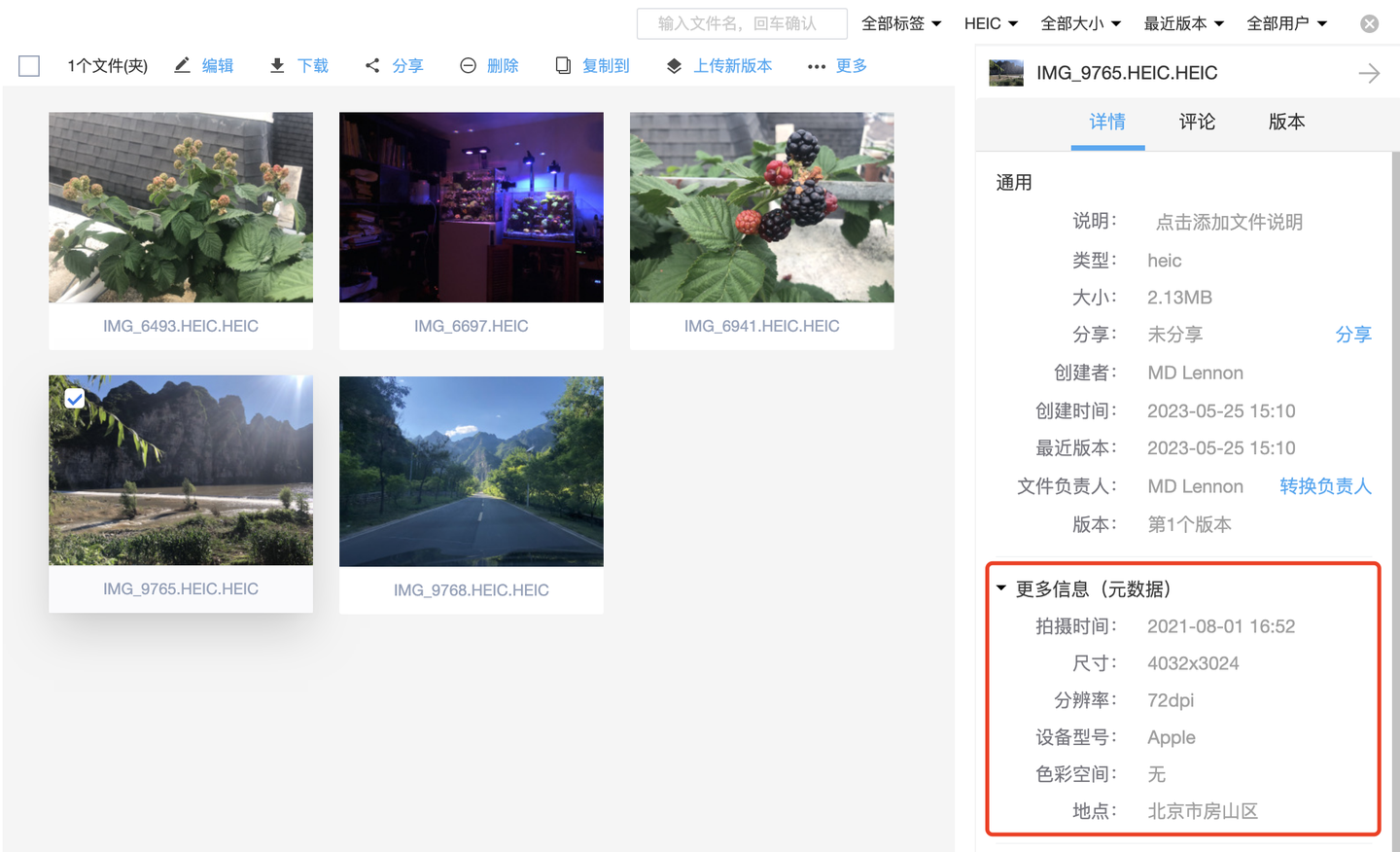
Available Metadata
Different image formats and capture devices contain different metadata. Commonly used fields include:
| Type | Examples | Usage |
|---|---|---|
| Shooting time | DateTimeOriginal, creation time, modification time | Archive, filter and rename by shooting date |
| Device information | Camera brand, camera model, lens model | Photography projects and image asset management |
| Image dimensions | Width, height, pixels, resolution, DPI/DPCM | Find printable images and distinguish thumbnails from originals |
| File properties | Size, extension, uploader, folder | Advanced search, batch processing and audit |
| Business tags | Enterprise tags, user tags, descriptions | Connect images to projects, products and material categories |
Search And Filtering
Advanced search can combine keywords, file type, uploader, time range, tags, file size, versions, descriptions and image metadata. For image-heavy organizations, metadata filtering reduces manual browsing effort.

Typical uses include:
- Find project photos shot during a certain period.
- Find print-ready materials that meet size or resolution requirements.
- Filter photography deliverables by camera model, lens model or capture device.
- Combine tags, descriptions, material categories and waterfall view to select candidate images.
- Combine OCR search, text-to-image search and image-to-image search to cover text, visual content and metadata.
Naming And Material Library
Image metadata can also participate in naming rules. Auto rename and batch rename can write shooting date, camera model and image dimensions into file names, so files retain useful context even after leaving the system.

In material library scenarios, metadata is often used with:
- Material categories and sub-libraries for brands, product lines or projects.
- Enterprise and user tags for cross-folder business meaning.
- Download approval, thumbnail visibility and file access control for high-value assets.
- Waterfall view for fast visual browsing.
- AI image search and OCR for visual and text-based discovery.
Privacy And Cleanup Guidance
Image metadata may contain capture device, shooting time, location or other sensitive information. Before external sharing, material delivery or public release, confirm whether specific metadata should be preserved, removed or hidden. For customer, employee, project site, R&D prototype and unreleased product images, combine metadata handling with permissions, watermarks, download control and audit logs.